Saturday, November 17, 2007


Is your DVD-R/RW working slowly on Windows Vista based computer?

Is your DVD-R/RW drive working slowly on Windows Vista based computer?
Are experiencing the slow read speed of the DVD-R/RW than expected speed on a Windows Vista based computer? On a Windows Vista-based computer when you finish recording an optical disc, such as a CD-R, a CD-RW, a DVD-R, or a DVD-RW disc and to record the optical disc, you use the DVD-R/RW drive, and you select the mastered disc format. Then, you will notice that the read speed of the drive is much slower than the expected speed. This slow read speed causes the Windows Vista operating system to take more time to copy files from the drive.

The reason for this slow reading is when the system is writing the disc, the drive uses a slow speed. However, some drives do not automatically set the drive speed back to the default speed after the system finishes writing the disc, and the system ejects the disc. Therefore, poor performance occurs when the system reads the disc again. So what's the solution? If you use a built-in DVD drive, you must restart the operating system, or you must resume from hibernation, to reset to the default speed of the DVD drive. If you use an external DVD drive, you only have to restart the external DVD drive. And if you want to automate this process a hotfix is available on request here.

Labels: ,

Sunday, October 21, 2007


SONY Cyber Shot DSC T200

SONY Cyber Shot DSC T200

Sony's popular line of Cyber-shot point and shoot digital still cameras has added a new model, the Sony Cyber Shot DSC T200. This camera has raised the image resolution to 8.1 megapixels. The company's previous models went only to 7.2 megapixels.

The T200 can send video to an HDTV set in true high definition at 1080p. It has a Carl Zeiss 5X zoom lens and 31 MB of internal flash memory. A slot for memory stick Pro Duo cards lets you add up to 8 GB of Storage.

SONY Cyber Shot DSC T200The T200 has a larger LCD screen than earlier models, at 3.5 inches, and it is touch-sensitive, so most functions are easily accessible. A special "Smile Shutter" mode takes a shot automatically when you have fixed the focus and your subject laughs or smiles. More traditional features include face recognition, red eye reduction and image stabilization. The SONY Cyber Shot DSC T200 cost $400.

Labels:

Wednesday, August 08, 2007


Sucess of CD's and DVD's

Sucess of CD's and DVD's CD’s and DVD’s are everywhere these days and are being used for storing Office/Personal Data, Movies, Music Files, Software. These Compact Discs (CD) and DVD’s have become a most common medium for storing the large quantity of Information.

Why CD’s/DVD’s have become more popular? – The answer to this question lies in the storage capacity of the medium. This medium (CD/DVD) have very large amount of space for storage.

The initial medium Floppy drive had only 3 megabytes of storage space where as one Standard CD has 700 megabytes of storage space. One can imagine how much data on floppy discs can be stored on one CD. To surpass this as well one standard DVD has 4.2 gigabytes of storage space or say one DVD can store data equal to 6 CD’s.


History

1979 Prototype CD system demonstrated in Europe and Japan.

1980 Compact Disc standards proposed by Philips and Sony.

1982 Introduction of CD’s in Europe and Japan

1983 Compact Disc technology in introduces in U.S.

1987 Video CD format Created.

1988 CD-recordable disc/recorder technology introduced.

1990 World CD sales close to one billion.

1997 DVD technology released.

1999 DVD-video becomes main stream.

2002 DVD-video ousts VHS-video; CDs continue to dominate software market.

Labels:

Thursday, February 15, 2007


Recover accidentally deleted MP3 songs, photos from iPod

Recover accidentally  deleted MP3 songs, photos from iPod
iPod data recovery tool is a nice utility that restore recover and retrieve lost music pictures video files folders Mp3 Photo songs images iPod memory of accidental deleted formatted reset corrupted damaged iPods including iPod shuffle, iPod Mini, iPod first generation and iPod Nano etc and other Equivalent Devices.
iPod data recovery software is a Non-Destructive iPod Data retrieval software utility to recover and retrieve music, pictures, video files and folders Mp3, Photo, songs, images, lost due to accidental deletion, format, corruption, improper restoration, damaged file system from corrupted frozen iPod memory accidentally formatted or data Reset performed by Apple Macintosh OSX or by Windows from iPod shuffle iPod Mini iPod first generation iPod Nano and other Equivalent Devices.

iPod Data Recovery software is easy safe Read-only and Non-Destructive iPod Data retrieval software utility. iPod data recovery software recovers music, pictures, video files and folders. This utilities works in case of lost delete, format, corrupt, improper restoration and damage iPod.

iPod Restore data recovery software is helpful to recover and retrieve your lost Mp3 Music, Photo, video, pictures, songs, images, File, Folders and all previously existing Data on your iPod.


Features:


  • Supports all type of apple iPods including iPod shuffle, iPod Mini, iPod first generation and iPod Nano etc and other Equivalent Devices.
  • iPod Data Retrieval Support for both type of formatting and Deletion either by Apple Macintosh OSX or by Microsoft Windows.
  • Ensures data recovery even from accidentally formatted iPod memory or accidental iPod data Reset operation performed.
  • Retrieve and Restore corrupted, damaged or frozen iPod files and folders form the iPod hard disk damaged due to human error or any Virus Generated Data Loss.
  • Recovers Data even if DRIVE NOT FORMATTED message is displayed by your Computer while accessing iPod Drive in My Computer and your iPod Data Partition Volume is not Recognized by the System.
  • Easiest Data retrieval software to restore lost music, photos and video (including wmv), undeleting deleted songs, recover formatted or damaged iPod files, iPod memory recovery before you your Fix corrupted iPod.

Download ipod data recovery software (size: 582.8 KB)

Labels: ,

Monday, February 05, 2007


Handling and cleaning of CDs/DVDs

Here's a list of tips on handling and cleaning your CDs/DVDs.

CD DVD1 Always handle your CD/DVD by the edges. Avoid touching the shiny side of the disc, as this is the side that the laser reads the information.
2 Cheap plastic sleeves may seem like a good idea at the time, but if exposed to extremes of temperature, the disc and sleeve may adhere to each other.
3 Acrylic jewel cases provide good protection against dust, scratches, light, and rapid changes in humidity.
4 Don't eat, drink, or smoke around your CD/DVD.
5 Never use a ballpoint pen to write on your CD/DVD.
6 Do not try to remove labels from your CD/DVD. The adhesive may pull off the foil on which the data is encoded.
7 To clean your CD/DVD, use a soft clean cloth and wipe from the center hub to the outer edge.
8 Never use solvents to clean your CD/DVD, as they may cause permanent damage to the disc. You may use Kodak Lens cleaner and a lens tissue or soft cloth to clean your discs.

Labels: ,

Tuesday, January 23, 2007


Democracy-Internet TV for all your Multimedia needs

Democracy video player, open-source software, can play any video format. e.g. Quicktime, WMV, MPEG, AVI, XVID etc. so you don't need to look further for any other video player. Democracy video player is project of Participatory Culture Foundation also allows you to download and save videos from YouTube, Yahoo video, Google video and any other sites and download any bit torrent media file, watch it in the Democracy player, this eliminates the need of running torrent program.


With Democarcy video player you can subscribe to any video RSS feed within Democracy player. If you are publishers or video makers democracy player also provides the Internet TV platfrom to get your videos out to thousands of people by allowing you to create channels for your videos.(Read more)


Download Democracy Player

Labels: ,


Difference between video DVD and DVD-ROM

Difference between Video DVD and DVD-ROMYou may have seen that some of DVD discs are available as either DVDs or DVD-ROMs, however you may be unclear on what the actual differences are between the two. When you see a product referred to as being available on DVD, this means that it's a standard video disc, very similar to the commercial movie discs that you get from the video store. These discs contain regular broadcast NTSC video (North American video standard) or PAL video (Phase-alternating line), which are designed to play on a standard set-top DVD player for viewing on a television set. You can always watch video DVDs with a regular DVD/TV setup, if your computer supports video DVD playback, you can also watch it on your computer desktop.

DVD-ROMs, on the other hand, are only viewable on a computer. A DVD-ROM is physically the same type of disc as a video DVD, but does not contain broadcast video and is not viewable on a standard DVD/TV setup. Instead, DVD-ROMs contain a computer program which runs on Macintosh or Windows systems. A set-top DVD player cannot run a computer program, and so DVD-ROMs won't work in a video DVD player.


The advantage of DVD-ROMs over video DVDs is that DVD program provides for a much higher level of interactivity than a video DVD.

Labels: ,

Thursday, January 18, 2007


Safely Eject CD/DVD manually using Emergency Eject

Yes, you can safely eject your CD/DVD manually using emergency eject in emergency such as failure of the drive or a power outage. If you have see your CD/DVD player a bit carefully you will see a very tiny hole below your CD/DVD disc tray either on right side or left side depending upon your CD/DVD manufacturer.

Here are the steps to safely eject CD/DVD manually:

1. Turn the Power to OFF.

2. Poke a fine-tipped object (such as a straightened heavy duty paper clip) into the small hole (as mentioned above, see image also). The front door will pop open and the disk tray will come partway out.
CD DVD Burner
3. Pull the front door to open it all the way, the grip the disk tray between thumb and forefinger ( if you cannot get a good grip on the disc tray with your fingers, use a steel binder clip or spring clamp to pull it out) and gently pull it straight out.

NOTE: You should only use this feature as last option or in emergency. Using it excessively will cause malfunction

Labels: , ,

Sunday, January 14, 2007


Buttonless Phone: XDA Orbit O2 SmartPhone

 XDA Orbit O2 SmartPhone
The XDA orbit is an O2 smartphone with a GPS receiver built in for satellite navigation. The slim handset runs windows mobile software and the 2.9 in screen shows off photos taken on the two megapixels camera. There are no number buttons.You can take calls by jabbing the touch sensitive screen with a finger or the supplied stylus. Its easy to control, using a tiny ball at the base of the screen, which can be rolled in any direction.


XDA orbit O2 smartPhone specification:
  • Dimensions 111.5 x 62.5 x 12.8mm
  • Windows Mobile 5.0
  • 2.9in 230k touchscreen LCD
  • P3300/Artemis/Compact III’s quad band
  • Integrated GPS
  • 128MB ROM
  • 64MB RAM
  • 2MP camera and audio and video playback
  • FM tuner and MicroSD slot
  • WiFi and Bluetooth

 XDA Orbit O2 SmartPhone

Labels: , , ,

Wednesday, January 10, 2007


Run Screensaver as Windows Vista Desktop

You can run a any screensaver as your Windows Vista Desktop. It will not degrade your system performance. It involves a bit of a hack. So are you ready to give a try ? But if you are not a Windows power user, you can do the same thing via an application that automates the process. This tool will enable you to select the screen saver and schedule start-up rendering, absolutely no code involved! You can download the application via this link.

But if you want to get your hands dirty, here is the manual method. (courtesy of Long Zheng). Alternatively, you can also access the SoapBox video demonstration .


  • First Boot your Windows Vista.
  • Open the Spy++ tool, which is used to assist in software debugging. If you don’t have a copy, download it here.
  • Use the “Window Search” icon, which is the binoculars icon in the toolbar.
  • Drag the “Finder Tool” on to the desktop. The area surrounding the desktop should be bordered. Release mouse. Click “OK”.
  • An item called “Folder View” should now be highlighted in the main window. Go up 2 parent items, and find “Program Manager”.
  • There should be a bunch of characters on the left like “0002010C”, record this set of characters.
  • Open the Hex to Decimal converter <>
  • Insert your set of characters into the “HEX value” box. Copy the resulting “Decimal” value. This is your “Handle ID”.
  • Open command prompt. Type in <<[Vista Drive]:WindowsSystem32mystify.scr /p [Your Handle ID]>>, you might end up with <>. Click Enter.

“With this practical yet simple method, you can emulate the look of Desktop Aurora without any system modifications or heavy impact on performance. However, it must also be said that this approach is very flawed, as it has several downsides that makes it impractical to use for extended periods of time. The concept is extremely simple. Run a screensaver on the desktop. But with the added power of DWM, you can get all the cool Glass effects on top of the screensaver, so it’s just like a real wallpaper. Screensavers has always supported the ability to be called to render on any surface to assist in development. But we can also utilize this method to create an interesting desktop background effect,” stated Zheng.

Ending the screensaver process via the Task Manager will terminate the desktop screensaver. But feel free to experiment. mystify.scr, ribbons.scr, aurora.scr and SSBranded.scr will all deliver an intense experience. “Whilst the result is fancy for a few minutes, it becomes impractical because the desktop icons are overlapped by the screensaver rendering. But since DWM renders on top of the screensaver, you get all the fancy translucent effects with the screensaver,” concluded Zheng.

Labels: , , ,

Sunday, January 07, 2007


Host Video or Audio Files for free on Archive.org

Host your Video and Audio files for free on archive.org with easy uploader. ccPublisher is a tool that allows you to tag your audio and video files with information about your license,title, keywords etc and it allows you to upload Creative Commons-licensed audio and video works to the Internet Archive for free hosting and get URL(live within 24 hours) so that you and your friends can download your uploaded file or publish the licensed and tagged audio works on your own site(useful if you have low disk storage or very low upload speed and facing problems while uploading large audio and video files). Just download the application and start uploading your audio and video files in minutes. cc application available for Windows, Mac and Linux.

To upload audio and video on acrhive.org, you need to create a account first.(create here). After installing application choose or browse file for upload, tag your file, choose license, select format, put username and password, start uploading and get your URL.(Learn more)

ccPublisher audio and video files uploader

Download ccPublisher Application (Windows 6.1 MB)
Download ccPublisher Application (Mac OSX 9.1 MB)
Download ccPublisher Application (Linux 385 KB)

Labels: , , ,

Tuesday, January 02, 2007


Watch Microsoft Office 2007 RTM Video

Microsoft Office 2007 RTM Video


Labels: , , , , ,


Watch Windows Vista RTM Video

Windows Vista RTM Video

Labels: , , , , ,

Wednesday, November 01, 2006


Download Windows Media Player 11 Final

Windows Media Player 11 build 11.0.5721.5145 final
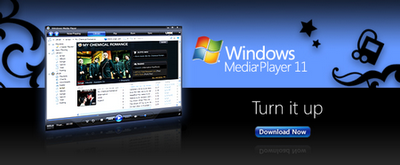
Finally Microsoft on Monday released the final product of Windows Media Player 11build 11.0.5721.5145 final. The update includes several enhancements, including a new user interface, improved syncing, and integration with the URGE music service. Download Media Player 11build11.0.5721.5145 (without windows validation )

Labels: , ,

Sunday, October 15, 2006


Samsung’s 10 megapixel camera phone (SCH-B600)

Samsung’s 10 megapixel camera phone (SCH-B600)
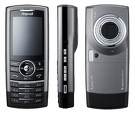
The new SCH-B600 will only be available to consumers in Korea. A new mobile phone destined for the Korean market will feature a 10-megapixel camera that includes a 3X optical and 5X digital zoom lens. Along with the camera, the Samsung SCH-B600 cell phone has Bluetooth, MP3 player, business card reader, and a TV-outputA new mobile phone destined for the Korean market will feature a 10-megapixel camera that includes a 3X optical and 5X digital zoom lens. Along with the camera, the Samsung SCH-B600 cell phone has Bluetooth, MP3 player, business card reader, and a TV-output. The SCH-B600 also has a 2.2-inch TFT-LCD display for users to watch live content through South Korea's TU Media satellite multimedia service. The SCH-B600 is also able to record video in 320-by-240 pixel resolution at 15 to 30 frames per second. The phone, however, carries a hefty price tag of $950.

Samsung's press release claims:

Samsung’s 10 megapixel camera phone (SCH-B600) is 6mm thinner and 10g lighter than the 7 megapixel camera phone (SCH-V770) and sets itself apart from its previous megapixel camera phones by combining mobile TV capability in Satellite standard.

The B600 offers the same level of picture-taking sophistication that a 10 megapixel digital camera offers. The camera function includes 3x optical zoom and 5x digital zoom.
Samsung hopes to stay at the front of mobile phone technologies and revolution with “the world's first 10 megapixel mobile phone.” Consumers first got a glimpse of the phone when it was unveiled during CeBIT in March.

Samsung is known for placing high megapixel cameras in its line of cell phones. In October 2004, the company launched a 5-megapixel camera phone to consumers in Asia. In November 2005, an 8-megapixel camera phone was released on the market.

Labels: ,

Friday, August 04, 2006


WINDOWS MEDIA PLAYER 11 BETA


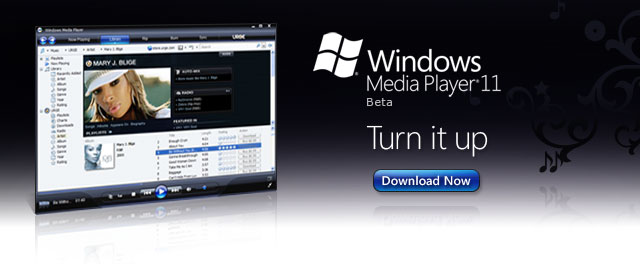
Windows Media Player 11 BETA for Windows XP offers you unmatched choice and flexibility for your digital media. You can easily manage your libraries of digital music, photos, and video on your computer; explore a new world of music through the integrated URGE music service; and connect with mobile devices so you can have your digital media collection wherever you want it. Windows Media Player 11 is designed to work with all versions of Windows.


Please Note If you use Windows Media Player to access a favorite online store, some are not available for this beta release. The following stores are available in the Windows Media Player 11 beta release: Audible, FYE, Live365, Movielink, MSN Music, Napster, Passalong, Puretracks, URGE, Wal-Mart, and XM Radio.
IF YOU HAVE A GENUINE WINDOWS XP.

Total Size: 23,449 KB 109 min @ 28.8 Kbps Readme,


DOWNLOAD wmp 11-windowsxp-x86-enu.exe

Labels: , ,