Wednesday, October 10, 2007


Microsoft Excel 2007 bug fixed

A two weeks ago i blogged on Excel 2007 calculation errors. To fix this issue Microsoft has released a 33MB patch that will fix the calculation bug in Microsoft of Excel 2007.

Microsoft Excel 2007 bug fixed
You can download the 33 MB Patch from here, this will also be part of Service Pack 1 of office 2007.

Labels: ,

Monday, October 08, 2007


Microsoft Office Mac 2008 packaging revealed

Microsoft Office Mac 2008
Microsoft has revealed the packaging of upcoming Office for Mac 2008. The box looks nice. Preview Office Mac 2008 here.
Microsoft Office Mac 2008

Source : istartedsomething

Labels: ,

Sunday, October 07, 2007


Now sort on colors in Excel 2007

Microsoft Excel 2007 Microsoft has introduced lots of new features in Office 2007 which helps us in doing the work much faster. The new feature I am going to talk about is Color sorting of data in Excel 2007. Till Microsoft Excel 2003 the color sorting is not available in excel. Suppose you have given different color to your data and now you want to sort it on color which is not possible in Excel 2003. Microsoft included this long awaited feature in Excel 2007. Generally people who handle large excel files know the important of this new feature which will ultimately help them to do work more efficiently and effectively.

Now sort on colors in Excel 2007
We are familiar with Conditional formatting wherein we can use different colors to differentiate between some special numbers. But when it comes to getting all those colored numbers collectively at one place, we pull our hairs as we need to do that one by one. Now with Excel 2007 it can be done with the ease of filters just use the filter command and it will give you the option of filtering with colors.

Now sort on colors in Excel 2007

Labels: , ,

Tuesday, October 02, 2007


Send text messages directly to mobile from Outlook 2007

Send text messages directly to mobile from Outlook 2007Microsoft has introduced some very nice features in Outlook 2007 to make the things much easier which we’ve always done. The Ribbon and the Quick Access Toolbar put the commands we need right at our fingertips. Now it’s quick and easy to compose and format message, add attachments, and then send. Tracking tasks, making appointments, scheduling meetings, working with contacts in Outlook 2007 is now lot easier.

But here we are talking about the new feature called “Outlook Mobile Service” in Microsoft Office Outlook 2007 that allows you to create and send text messages as well as multimedia messages to a mobile device from within Outlook in a manner similar to e-mail messages. Most of us prefer communicating with colleagues through e-mail or mobile phone. Outlook Mobile Service makes it easier to use both these media and is fully integrated with Outlook. With Outlook Mobile Service, composing and sending a text or multimedia message is now as quick and easy as creating and sending an e-mail message. After the message is sent, you can see it in the Sent Items folder in your Inbox.

After it is installed, Outlook Mobile Service becomes a part of Outlook, with options for mobile messages available along with the options for e-mail messages. The mobile messages that you send will be saved in your Sent Items folder, just like the e-mail messages that you send. The mobile messages that you receive will be sent to your Inbox if you want them to be, just like regular e-mail messages. You can also save mobile messages in the Drafts folder for later use. By using Outlook Mobile Service, you can send a message both as an e-mail message and as a mobile message to multiple contacts at the same time. You can stay informed when you are away from the office because Outlook Mobile Service can forward the e-mail messages and calendar appointments that you choose directly to your mobile phone. In addition, you can receive messages from a mobile phone directly in your Outlook Inbox, use a mobile address book that has information about all your mobile contacts, and redirect summaries of your Outlook Calendar to your mobile phone.

How Outlook Mobile Service works?

Send text messages directly to mobile from Outlook 2007Outlook Mobile Service works with the mobile service provider for your mobile phone to provide you with a seamless communication experience. After you send your mobile message from your computer, it goes to the Web service for Outlook Mobile Service, which is hosted by your mobile service provider, and is then sent to the mobile phones that you choose.

If your message recipients want to reply, they can do so from their respective mobile phones. The messages sent by the recipients are handled by their respective mobile service providers and sent back to the Web service for Outlook Mobile Service. From there the messages are sent back to your e-mail Inbox, your mobile phone, or both, depending on the preferences you choose.

Note: Multimedia message functionality is not available to wireless service subscribers in the United States. The Outlook Mobile Service is restricted to text messages only in the United States.

Labels: ,

Sunday, June 03, 2007


Microsoft Unveils Surface Computing

Microsoft Unveils Surface Computing

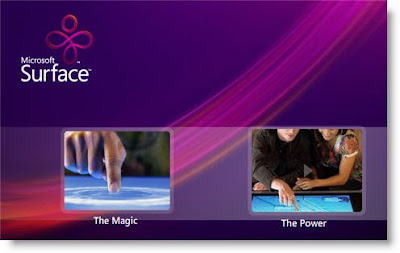
Microsoft has unveiled its latest innovation, a coffee-table shaped computer that responds to touch and everyday objects like cups and plates through the special bar codes, called 'Surface' is essentially Microsoft computer tucked inside a black table base, topped with a 30 inch touchscreen.


Surface is the first commercially available surface computer from Microsoft Corp. It turns an ordinary tabletop into a vibrant, interactive surface. The product provides effortless interaction with digital content through natural gestures, touch and physical objects. In essence, it’s a surface that comes to life for exploring, learning, sharing, creating, buying and much more. Soon to be available in restaurants, hotels, retail and public entertainment venues, this experience will transform the way people shop, dine, entertain and live.

Five cameras sense nearby objects so users can interact with the machine by touching or dragging their fingertips across the screen, or by placing objects such as plates and cutlery tagged with special bar codes labels.
Microsoft Unveils Surface Computing
Unlike most touchscreens, Surface can respond to more than one touch a time. The intuitive user interface works without a mouse or keyboard, giving people direct interaction with digital content.

Some of the first Surface models are planned to help customers pick out new mobile phones. When customers place a phone down on the table, Surface will read its bar code and display information about the handset. Customer can also select calling plans and ring tones by dragging icons toward the phone. Guest sitting in some hotel lobbies will be able to cluster around the surface to play music, then buy songs using a credit card or rewards card tagged with a bar code.

In some hotel restaurants, customers will be able to order food and drinks, then split the bill by setting down a card or a room key and dragging their menu items onto the card. Visit Microsoft Surface (Site takes some time to load, so have patience)

Microsoft Unveils Table top Computing

Labels: ,

Monday, May 14, 2007


Light up your Web with Microsoft's Sliverlight

Light up your Web with Microsoft's Sliverlight
Microsoft's Silverlight is a cross-browser, cross-platform plug-in for delivering the next generation of .NET–based media experiences and rich interactive applications for the Web. Sliverlight deliver enhanced media experiences and rich interactive applications for the Web that incorporate video, animation, interactivity, and stunning user interfaces, create richer, more compelling Web experiences that take greater advantage of the client for increased performance and stunning vector-based graphics, media, text, animation, and overlays that enable seamless integration of graphics and effects into any existing Web application.

Microsoft's Silverlight gives support for both Mac and Windows browsers such as Internet Explorer and Firefox . Silverlight enables developers and designers to easily use existing skills and tools to deliver media experiences and rich interactive applications (RIAs) for the Web.


Download Microsof's Sliverlight

Labels: , , ,

Saturday, January 13, 2007


Run Windows Vista on Slower PC

If you love Windows Vista and want to install (on slower PC) or installed on you PC and after installing you have to wait long to windows vista to boot up as your PC don't meet the minimum configuration criteria as mentioned by Microsoft. I also feel the same when I installed Window Vista on my PC. My PC configuration is :

  • CPU: Pentium 4
  • Hard Disk: 80 GB
  • Ram: 256 MB

I was also not satisfied with the way this operating system startup then I applied the below remedies. The below steps will enable you to enjoy Vista Operating System with low system configuration as I am running it on my PC:

1.Boot Up Window Vista
2. First switch the control Panel View to Classic view (it will make easier to work).
3.Go to Program And Features.
3.Click Turn Windows Features On or Off.
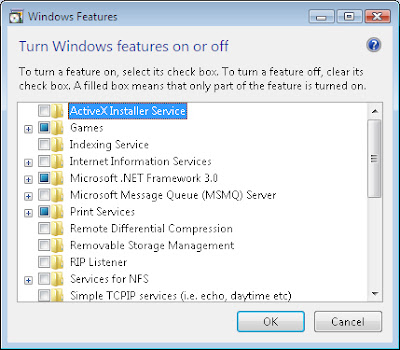
5.Now a POP UP will appear on the screen with Name "Windows Features". Since the Vista (assuming you have got windows Vista ultimate) is advanced version of Windows with varied capabilities that are unmatched with any of the earlier versions of Operating System, it includes as default the games and other services which are more advanced and heavy for running with low RAM and system configuration.

What I did here is as follows :

In Games,
I unchecked the unwanted games.
In Print Services,
I unchecked the option Internet Printing Client.
Remote Differential Compression is unchecked.
Tablet PC Optional Components is unchecked.
Windows DFS Replication Service is Unchecked.
Windows Fax and Scan is Unchecked.
Windows Meeting Space is Unchecked.
Windows Ultimate Extras is Unchecked.
Windows Vista Settings
If you are not sure what is the function of the various items listed in the window, just hover it with the mouse and the system itself will give a information box about the option so hovered.
Now click ok, this will configure some settings of Windows and take some time. After which the system itself will ask to restart. Restart the computer which also will take more time than usual.

After the system gets restarted, Right click on Desktop icon My computer (If it is not visible on Desktop, then go to start menu and right click computer). Here click properties. In properties click Advanced settings and click continue. Under Advanced tab in Performance box click Settings. In this select Adjust for best performance. Now click apply and OK. This will bring the system to Windows 98 look.


Now the main settings :

On desktop, Right click and choose personalise. Now choose Windows Color and Appearance. Here Choose Windows Vista Basic in Color Scheme and click apply and ok. This will bring back the looks of Vista. Enjoy improved performance with Complete Vista look.
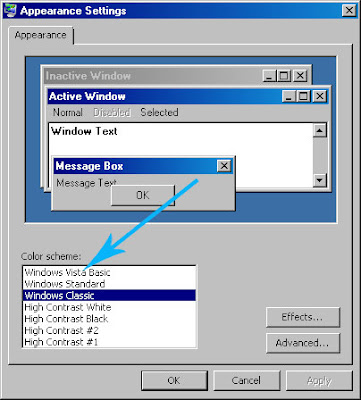

Windows Vista Settings
Please note that after all the above steps snipping tool and Window ultimate features will not be available as before.

Labels: , ,

Friday, January 12, 2007


Set Video as Desktop wallpaper using DreamScene

DreamScene, Microsoft's Windows Vista ultimate feature allows you to set any video from your computer as a desktop wallpaper (Watch Video). You can select any high quality video for your desktop wallpaper the same way you select a stationary wallpaper. This effect will not result in any extra electrical consumption if you are using dreamScene on your laptop and even pauses the video to save battery power.


Requirements for running Windows DreamScene :

  • Windows DreamScene supports only .mpeg and .wmv video file formats.
  • Windows DreamScene video support requires a graphics card that supports Windows Aero.
For computers that do not support the Windows Aero desktop experience, this Extra still has something to offer: Windows DreamScene adds new positioning options for backgrounds, including stationary pictures. Download DreamScene zip (size: 26.96 MB)

Get Windows Vista Ultimates

Labels: , , , ,

Wednesday, January 10, 2007


Run Screensaver as Windows Vista Desktop

You can run a any screensaver as your Windows Vista Desktop. It will not degrade your system performance. It involves a bit of a hack. So are you ready to give a try ? But if you are not a Windows power user, you can do the same thing via an application that automates the process. This tool will enable you to select the screen saver and schedule start-up rendering, absolutely no code involved! You can download the application via this link.

But if you want to get your hands dirty, here is the manual method. (courtesy of Long Zheng). Alternatively, you can also access the SoapBox video demonstration .


  • First Boot your Windows Vista.
  • Open the Spy++ tool, which is used to assist in software debugging. If you don’t have a copy, download it here.
  • Use the “Window Search” icon, which is the binoculars icon in the toolbar.
  • Drag the “Finder Tool” on to the desktop. The area surrounding the desktop should be bordered. Release mouse. Click “OK”.
  • An item called “Folder View” should now be highlighted in the main window. Go up 2 parent items, and find “Program Manager”.
  • There should be a bunch of characters on the left like “0002010C”, record this set of characters.
  • Open the Hex to Decimal converter <>
  • Insert your set of characters into the “HEX value” box. Copy the resulting “Decimal” value. This is your “Handle ID”.
  • Open command prompt. Type in <<[Vista Drive]:WindowsSystem32mystify.scr /p [Your Handle ID]>>, you might end up with <>. Click Enter.

“With this practical yet simple method, you can emulate the look of Desktop Aurora without any system modifications or heavy impact on performance. However, it must also be said that this approach is very flawed, as it has several downsides that makes it impractical to use for extended periods of time. The concept is extremely simple. Run a screensaver on the desktop. But with the added power of DWM, you can get all the cool Glass effects on top of the screensaver, so it’s just like a real wallpaper. Screensavers has always supported the ability to be called to render on any surface to assist in development. But we can also utilize this method to create an interesting desktop background effect,” stated Zheng.

Ending the screensaver process via the Task Manager will terminate the desktop screensaver. But feel free to experiment. mystify.scr, ribbons.scr, aurora.scr and SSBranded.scr will all deliver an intense experience. “Whilst the result is fancy for a few minutes, it becomes impractical because the desktop icons are overlapped by the screensaver rendering. But since DWM renders on top of the screensaver, you get all the fancy translucent effects with the screensaver,” concluded Zheng.

Labels: , , ,


Perform the Right Mouse click on Keyboard

Perform right click on the keyboard using SHIFT + F10 KEY
It is so easy to perform right click on keyboard if your mouse is not working.

Steps:
1 First Select a file/folder(obviously).
2 Press the SHIFT + F10 key will perform the Right click of mouse.

Labels: , , ,

Tuesday, January 09, 2007


Now Windows Vista Wow

windows Vista Wow Contest
Microsoft says "The countdown to the release of Windows Vista has officially begun. With the Consumer Electronics Show (CES) in Las Vegas as the backdrop, and joined by a world of software and hardware partners, the "Wow" has definitely started. Here's just a taste of what you can expect when Windows Vista makes its debut on January 30."

What is "Wow?"
Most exciting moment in your life which you have captured in your your camera, thats "Wow". Pick your own videos or Photos and show the World your "Wow".

You can win something special from this Windows Vista "Wow". This contest is open for worldwide. Microsoft select one lucky winner per qualifying/region, and one grand prize
winner from the globe. Contestant must be 18 years or older and a resident of participating countries.(Official Rule)

What Microsoft Windows Vista "Wow" will offer to winners?

Grand Price: Global Prize winner will receive a high definition video camera and a seven-day trip for two to experience their choice of the world's most stunning vistas: Sydney's Harbor Bridge and Opera House; Beijing's Great Wall; Agra's Taj Mahal; York's Empire State building, or Paris' Eiffel Tower.

Finalist Prize: Only one per qualifying country/region- will receive their choice of a deluxe Windows Vista Ultimate desktop and monitor or laptop, loaded with all the features that make Windows Vista a "Wow" worthy revolution in PC computing. Go Wow, Windows Vista Wow Get Ready

Labels: , ,

Monday, January 08, 2007


Show F1-F12 functions in Microsoft Word

Microsoft Word Customization


1.Start Word and go to Tools, Customize
2.On the Tool bars tab, check 'Function Key Display' option

At the bottom of Word a new line with F-keys and descriptions will appear. ALT or SHIFT F-key functions are also displayed in the toolbar when you press ALT or SHIFT.

F1-F12 Keys on Microsoft Word

Labels: , ,

Tuesday, January 02, 2007


Learn how to Upgrade to Windows Vista from XP

But Watch this Video first "Windows Vista Demo", you may change your mind.

Watch this Video to learn how to upgarde to Windows Vista from Windows XP.

Labels: , , , , ,


Watch Windows Vista RTM Video

Windows Vista RTM Video

Labels: , , , , ,

Sunday, December 31, 2006


Apple iPhone fan blog

Yesterday I came across this nice blog http://appleiphone.blogspot.com by Okan Vardarova, a Apple's products fan. In this blog you can find cute pictures of Apple's product (apple iPod, Apple cell phone, apple iPhone and other latest gadgets pictures) submitted by the Apple fans. This blog has got 299.757 pageloads since Oct 2006.

Labels: , , , , ,

Thursday, December 14, 2006


EARN MONEY BY LEAVING YOUR COMPUTER ON

PPC Appraisal Program: EARN MONEY BY LEAVING YOUR COMPUTER ON

This program is very simple to download, entirely free and really works!

Requiring no sponsoring, no costs at all to join, once it has been set up, the only thing you do is leave your computer on and the system will just automatically run and you can trace your income by the second.

This program operates comparable to "click on a search engine and get paid" programs, with the exception of the following:

1.It is run automatically similar to auto surf, so there is no need for you to click on any link.2.It does not provide you with only one search engine, but there are at least twenty one now running.
If you continually run your computer for eight to twenty four hours a day, you may earn up to fifteen dollars a day. At the end of the month, when they will be adding up to two hundred more search engines, you may earn up to sixty dollars a day, not doing anything, just be online.

Every search engine builds up an independent total of your time surfing. You must reach sixty dollars before payment be done by each of the search engine.

Normally, when you are running your computer online for twenty four hours each day, without any referral, for you to reach sixty dollars, it would more or less take you up to two months, with the now running twenty four search engines. Now consider this, sixty multiplied by twenty four will equal to one thousand four hundred forty. This is how much you will make in two months, of doing nothing.

Signing up:Take note of this URL, as you will use this as your sponsor:

1 For PPC Appraisal Program
CLICK HERE

For NETERMINATOR Program CLICK HERE

For Rotator Master Program (ADULT CONTENT WILL BE DISPLAED WHILE AUTO SURFING) CLICK HERE to fill out the form.


2.Where it is asking for the company name, put PPC appraisal while filling PPC appraisal sign up form, Neterminator while filling Neterminator sign up form and RotatorMaster (Warning adult sites are auto surfed in this program but highest Earning Possible, You can use my trick first signup for Rotator Master then use two browser Internet Explorer and Firefox then uncheck the show picture box under Advanced tab in Ougo Browser, Tools-- Internet Options- Advanced, then pictures will not be displayed in the browser then put your rotator url in the Ougo Browser as mentioned in this post and resize your browser to minimum and run the rotator url and use firefox for your browsing ) while filling Rotator master sign up form.

Read the instructions care fully otherwise you will not able to join these programs:

For the URL or Company name: put ppcappraisal.com, Neterminator or RotatorMaster

Give your genuine email ID

For tax ID: put N/A

Fill the rest of the form with your personal information

Use only Ougo browser (faster than test33 browser) for these programs otherwise your auto surf will not be counted by the sites click here to download
Ougo browser

3 Log in (this will take you on to a menu)

4 Hit select all at the pages' bottom (only for PPC Appraisal)

5 Then hit campaigns, give a title to your portal rotator, click add new rotator and then click "Composition of Rotator" under link column, this will opens a new window scroll down the page , click select and then click "Add resources in rotator", you will see your resource rotators in resources column, don't forget to save your rotator and finally copy link to rotation script for portals (for other two programs copy and paste portal url in ougo browser).

6 In the Ougo browser go to tools- developers- analyst- act- setup; you will see two squares that are empty; on the lower left side, click append and wait for the pop up window to appear open.

7 Inside that window, type in set 1 and hit OK and right side put portal url of all programs (put only one url in a line) and click OK.

8 After which, it will fade away.

9 Go back to tools-developers- analyst- act- hit - set 1 and the url will load.

10 Go to Navigation menu, click on the word "six" and this will open up six different search engines.

11 Now the Ougo browser will start on clicking all search engines.

12 Do not adjust any settings. You can minimize the window and still work on your normal computer wok. It will just continue on clicking the search engines and will never interfere with what you do. These are search engines that use up or get a run through this particular program. They are doing this and making payments to improve or increase their numbers so they can have a better chance to compete with Google or yahoo.

13 Don't forget to check your earnings (showing of earining in account can be delayed by 24 hours).


Rotator Master


Rotator Master


Ougo Browser


Ougo Browser


Ougo Browser


Ougo Browser


Ougo Browser


Ougo Browser


Ougo Browser


Ougo Browser

Labels: , , ,

Friday, December 08, 2006


Download Microsoft Office 2007

Microsoft Office 2007
Try out your choice of suites or programs from the 2007 Microsoft Office release for 60 days! Trial programs contain the same functionality that you get when you buy the perpetual versions-but only for a limited time.

Office Professional 2007 helps professionals work faster, stay organized, and manage contacts and customer information in one place. Visualize data more effectively; forecast, track, and manage projects and opportunities; and produce professional-quality marketing materials entirely in-house. Discover the quickest way to more easily find, organize, analyze, and use all the information you need to succeed. Download the your suitable office suite by visiting this link
http://www.appuvista.com/officetools-softwares.html and download visit these link to obtain a valid license.

For US residents go to http://www.trymicrosoftoffice.com/
For outside the US you need to go
Canada: http://www.trymicrosoftoffice.com/canada
UK/Ireland: http://www.trymicrosoftoffice.com/ukireland
Germany: http://www.trymicrosoftoffice.com/germany
France: http://www.trymicrosoftoffice.com/france
Japan: http://www.trymicrosoftoffice.com/japan

Labels: ,


Download Latest Adobe Reader 8

Adobe Reader 8
Download free Adobe Reader 8 software to more securely view, print, search, sign, verify, and collaborate on PDF documents, online as well as offline, from your home or office.
To download Abobe Reader 8 (20.8 MB) go to
http://www.AppuVista.com/officetools-softwares.html

Labels: , ,

Thursday, November 30, 2006


Vista Transformation Pack 6 RC1 is Released

This release will cover on new system files replacement system which should be 100% working fine as far as testers reported. It also have huge improvements regarding setup integration and uninstallation. In this pack various bug are fixed for setup integration which should work much better than version 5.5 and added more options about uninstallation for system.This pack offers same user interface like Transparent borders for Windows, Icons etc as in Vista.

Labels: , , ,

Monday, November 20, 2006


Download Google SketchUp

Google sketchup
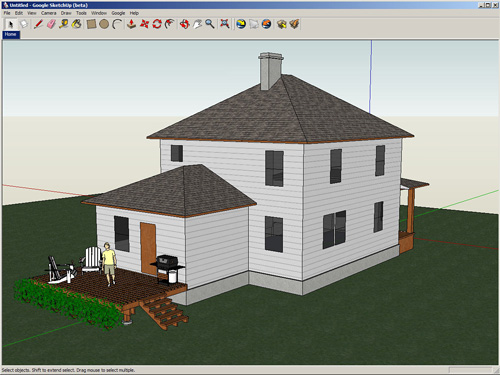
Google SketchUp (freeware) is an easy-to-learn 3-D modeling program that enables you to explore the world in 3D. With just a few simple tools, you can create 3-D models of houses, sheds, decks, home additions, and woodworking projects - even space ships. And once you’ve built your models, you can place them in Google Earth(download Google earth latest version), post them to the 3D Warehouse, or print hard copies.

SketchUp is a simple but powerful tool for quickly and easily creating, viewing and modifying your 3D ideas.

Click on a shape and push or pull it to create your desired 3D geometry.
Experiment with color and texture directly on your model.
Real-time shadow casting lets you see exactly where the sun falls as you model.
Select from thousands of pre-drawn components to save time drawing.

See Google Sketchup
Video Tutorials
Download: Google SketchUp for Windows (19.05 MB)


TECHNORATI TAGS:,

Labels: , , ,