Thursday, January 01, 2009


Crack Password Protected PDF files with free PDF Crack tool

Generally PDF files are password protected to limit the unauthorized access or certain features like copying and printing. If you have forgot the password of password protected PDF file,  you can use free PDF crack tool to crack/recover the password instead of going for paid PDF file crack/recover tool.

Crack Password Protected PDF files with free PDF Crack tool

Features
  • Supports the standard security handler (revision 2, 3 and 4) on all known PDF-versions
  • Supports cracking both owner and userpasswords
  • Both wordlists and bruteforcing the password is supported
  • Simple permutations (currently only trying first character as Upper Case)
  • Save/Load a running job
  • Simple benchmarking
  • Optimised search for owner-password when user-password is known

Download Free PDF Crack/Recover tool

Labels: ,

Saturday, December 27, 2008


Get Experts-Exchange account For Free Without Credit-Card details


You must have come across Experts-Exchange site while searching answers for you questions on Google. But to see the answer you have to buy paid subscription of Experts Exchange site. But you can get a free account on Experts-Exchange site without using the Credit card details here .
free experts-exchange account Just  fill in your details and submit and you’re ready to go.

Labels: ,


Activate AVG 8 for 10 years using free License key

Activate AVG 8 for 10 years using free License key. Yes, you can activate AVG 8 using following key for 10 years subscription. Once activated AVG subscription last long till 26-Feb-2018.

image

Download AVG 8 from AVG paid version download page. Use following License key to activate for 10 years subscription.
8MEH-REDSL-7ETEC-ULA8R-EAOKL-4EMBR-ACED

Labels: ,

Friday, August 01, 2008


Windows Vista Performance and Tuning Guide from Microsoft

Windows Vista users can tune their OS and make it super fast by using Windows Vista Performance and Tuning Guide from Microsoft. Download Windows Vista Performance and Tuning Guide from Microsoft.

Labels: , ,

Sunday, December 30, 2007


Try Mobile Phones before you purchase

Try Mobile Phone before you purchaseFinding the right mobile device just got easier with the site called tryphone.com. The free, still in beta TryPhone website give you the ability to try before you buy with fully interactive online virtual handsets to test drive mobile devices. application, content and convenience of your browser. You can click the phone's buttons with your mouse to check out the various menus, launch the mobile Internet browser, fire up the camera, or start dialling a number. The demos take you through such basic task as how to set a ringtone, change wallpaper or access voicemail. However, don't expect to actually surf the mobile Web or add contacts-the interactivity is just to give you a feeling for a phone's interface.

The only downside with tryphone site is that it has only a handful of handsets featured the iPhone, the LG Muziq. the Sam sung juke and the Blackberry Pearl. The website is still in beta stage, so hopefully there should be a slew of new devices added soon.

Labels: ,

Friday, December 21, 2007


Turn your mobile phone into web cam

Imagine a big occasion in your home and at the last moment this come your notice that your favorite Web cam is out of order. And now don't have the enough time to get it serviced or purchase a new one. Wouldn't it be nice to turn your phone in to web cam and shoot the event? Don’t worry there are some very good applications that will allow you to transform a camera enabled phone in to a webcam to be used along with a PC.

First talk about Motvik Wigo (Webcam Whenever I Go) freeware application that will allow you to transform a selected Bluetooth enabled Nokia phones in to a wireless web cam to be used along with a PC through Bluetooth dongle. Download Motvik

Turn your mobile phone into web cam - Motvik

Second application is Mobiola webcam, a shareware application that allow to you to transform Nokia, Sony Ericssson, Motorola and Windows Mobile enabled smart phones camera enabled phones in to webcam. The package, which consists of a client on your phone and a driver on your computer, allows one to run a webcam feed to the computer using either Blue tooth or USB. Also Works with Skype, Yahoo, YouTube, MSN, AOL IM, ICQ. Download Mobiola webcam trial version here.
Turn your mobile phone into web cam - Mobiola Webcam Compatible devices

Windows Mobile Windows Mobile 5 and 6 devices equipped with camera including Smart phones.
Nokia 6600, 6620, 7610, 6630, 6670, 6260,6680, 6681, 6682, 3230, N70, N90, 3250, 5500, E50, E51, E65, E70, E90, N71, N73, N76, N80, N81, N82, N91, N92, N93, N93i, N95
Sony-Ericsson P1i, P990, M600, W950, W960, P800, P900, P910, P990, K610, K618, W610, V630, W710, Z610, Z710, K790, K800, W830, W850, W900, W810, S500, T650, JP-8, Z750
Motorola Z8

Labels: , ,


How to install Adobe Acrobat Reader 8 on Vista?

Adobe Reader 8 installation Error
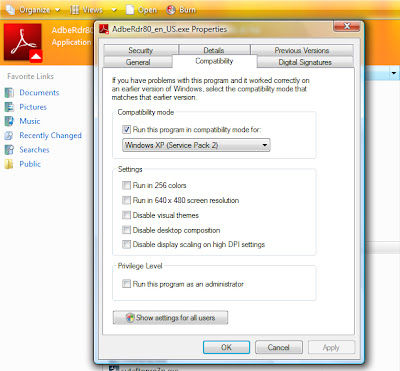
If you getting the error like this"The windows installer service could not be accessed. This can occur if the windows installer is not correctly installed. Contact your support personnel for assistance" then you are not the alone person who is experiences this. But with a little tweaking you can easily install Adobe acrobat reader 8 on Windows Vista.

Right click on the setup exe that you have downloaded from Adobe site and navigate to compatibility tab check the box against "Run the program in compatibility mode" and choose Windows XP (Service Pack 2) finally click OK and run the Adobe reader setup exe.
Compatibility mode setting for Adobe Reader 8
What it will do? It will install the Adobe reader 8 on Windows Vista as it would doing installation on Windows XP.

Labels: ,

Tuesday, December 04, 2007


Download Vista Transformation Pack 8

Vista Transformation Pack 8
Windows X site has released Vista Transformation Pack 8 to the Public with some great improvement and fixed some bugs as well. The Vista transformation Pack 8 completely turns your Windows XP in to Windows Vista without paying a single penny.This Vista Transformation version 8 also includes WinFlip application which makes it to be almost par with Windows Vista.

Features:

Vista Transformation Pack will replace many of the resources in Windows XP/Windows Server 2003. It can change such things as:
  • Boot screen
  • Welcome Screen / Logon Screen
  • New msstyles files (visual styles)
  • New desktop and file icons
  • New toolbar icons
  • Progress Dialogs
  • Sounds scheme
  • System Tray icons
  • New Wallpapers
  • Windows Media Player Skins (see changes done in Vista Transformation 8)

Download Vista Transformation Pack 8

Vista Transformation Pack 8 Flip

Labels: , , ,

Tuesday, November 27, 2007


Now get stream effect in Windows Vista Aero

Now get stream effect in Windows Vista Aero
ForXy has created a stream effect for Windows Vista Aero. This stream effect will be visible around the edges of windows. This effect makes the windows aero more appealing and realistic one.
How to get Stream effect in Windows Vista Aero?
Open Aero.msstyles (%WinDir%\Resources\Themes\Aero) in e.g. Restorator or Resource Hacker and replace the resource 850.png in STREAM folder. Then apply the modified Aero style. Download Stream effect png file.

Labels: , ,

Monday, November 26, 2007


Give online life to desktop documents

Give online life to desktop documentsThirty Indian engineers based in Bangalore have created a suite of online productivity tools that enables such users to enjoy the look, feel and much of the functionality of the newest edition of the three main Microsoft Office tools by downloading for free, a 5-megabyte chunk of software. What’s more, they can work on their files, from any machine anywhere by accessing them from a 100 megabyte storage space that is provided to them on the Web; they can switch seamlessly from desktop to Web and back; they can share their files from chosen friends or colleagues; they can collaborate on a single document, deciding who can share what, and exchanging comments live through text pop-pops... all this on any platform, Windows, Linux, Unix or whatever.

The application is called Live Documents. It was unveiled a few days ago to a lot of global interest and critical scrutiny. It is the work of the Bangalore-based InstaColl, a wholly Indian Internet-driven company whose Chairman and inspiration is Sabeer Bhatia, the man who co-developed Hotmail, the world’s first Web-based e-mail service, which he subsequently sold to Microsoft.

While the ability to use Live Documents is free for individual users (You can apply for an invitation to join at http://www.live-documents.com/ but due to the huge number of requests in the last few days, the company is having to beef up its infrastructure and it might take 3-4 weeks to receive your authorisation.) Source: The Hindu

Labels: ,

Friday, November 09, 2007


Install Windows Vista on using less 512MB of RAM

Everybody knows, Windows Vista is a resources hungry operating System that requires at least 512 MB of RAM to install. But with a simple trick you can install Windows Vista on system which less than 512 Mb of RAM but it is recommend to increase or upgrade your RAM to run Windows Vista simple, easier and faster. Here is the procedure to Install Windows Vista on using less 512MB of RAM:

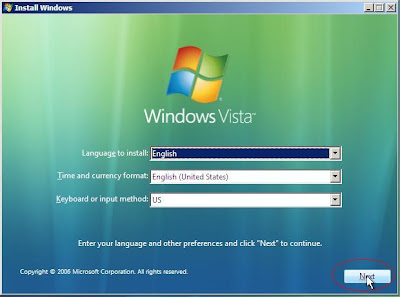
1. Boot from Windows Vista DVD
Install Windows Vista on using less 512MB of RAM
2. Select your language, currency and keyboard setting and click NEXT.
Install Windows Vista on using less 512MB of RAM
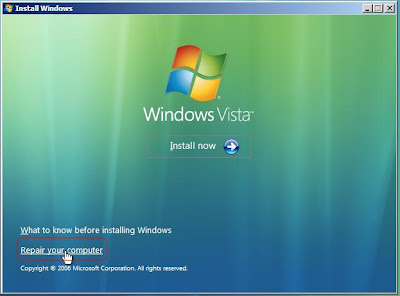
3. At next screen click on Repair your computer and process next to get system Recovery Options.
Install Windows Vista on using less 512MB of RAM
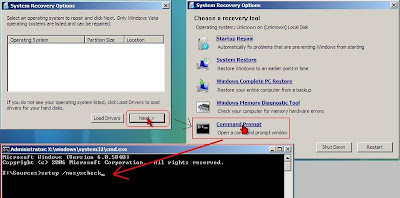
4. Now click on Command prompt and run setup /nosyscheck and perform installation. This will prevent the Windows Vista to check your system configuration and you will be able to install the Windows Vista on system running on less than 512 MB of RAM.

Note: This tutorial is taken from the Windows Vista -- Reg Tweaks Tips & Tricks by RAMESH on MeraWindows.

Labels: ,

Saturday, November 03, 2007


Can you create a folder without giving it a "name"?

Creat folder without a nameHave you tried it before? if no lets it try now and if you get the success in creating a folder without giving it a name to it, then its OK. But if not then don't get disheartened just create a new folder then hit backspace key to delete the new folder(default name) given by the windows and press "Alt + 255". Hit enter and done. You have a unnamed folder in front of you.

Labels: ,

Monday, October 29, 2007


How to "Clean Install" with Windows Vista upgrade Version

Wundows Vista logo
If you have purchased a Windows Vista upgrade version then you did a marvellous job as it saved you lot of money. With this you can upgrad your Windows XP into Windows Vista. As you know the upgrade version of Windows requires previously installed windows on your system but you can't make a clean install with the upgrade version of Windows Vista. Is it so?

No you can do a clean install of Windows Vista with upgrade version of Windows Vista but it requires little bit of trick to spoof Windows Vista upgrade version to pretend that your system has a previously installed copy of Windows.

Procedure to do a clean install with Windows Vista upgrade Version :
Insert the Windows Vista upgrade version DVD in the drive and boot up. Then click on Install Now button,this will start the windows installation. Now the main trick. Don’t enter your Windows Vista product key. Select the version of Windows Vista you have bought. When the windows installation has finished, access the DVD through Windows Explorer and re-run the setup process and carry out another installation.When prompted, enter your product key, continue with the installation. You now have a working installation of Windows Vista.

Labels: ,

Saturday, October 27, 2007


Excel Tips

Splitting Windows and Freeze Panes:
Splitting Windows allows you to work on multiple parts of a large spreadsheet simultaneously. It also allows you to always keep one part if the spreadsheet visible on screen.

Select the cell above which you want to freeze the panes in excel. Then in menu bar go to Windows - Freeze panes.
This will Freeze the rows and cloumns before the selected cell. You can also unfreeze the panes by selecting in the menu bar..go to windows unfreeze panes.


Hide and Unhide Command:
For Rows and Columns
This command helps you to hide or unhide the rows and columns in an Excel sheet. The command simplifies the work and prevents certain data to be visible.

Select the row or column you want to hide then on menu bar go to Format then select Row - Hide or Column - Hide.
You can also select the row or column then right click with mouse over it and then choose hide.
This will hide the selected rows or columns.
You can also unhide the rows and column by choosing the option unhide using same steps as listed above.

For Sheets in a workbook:
This command hides the tabs in a workbook which enables the user to hide the whole of the working on a tab.
Just select the tab you want to hide then in menu bar select Format - Sheet - Hide.
Similary select Format - Sheet - Unhide to unhide the hidden whole sheet.

Labels:

Monday, October 15, 2007


Hack to download Vista SP1 using Windows Update

Want to download Windows Vista Service Pack 1 beta from Microsoft site using Windows update in legal way? Here is a solution for that, first download SP1Beta_Hack.cmd and after downloading run it with Administrator Privileges. You should see a successful message displayed on screen in Command Prompt.

Now run Windows Update and Check for updates. It will show you the KB935509 hotfix. Download it and restart your computer.Again check for Windows Update. This time you will find a update called KB937287 hotfix, download it. After downloading it, restart the computer and run Windows Update again and you will find another KB938371 hotfix, download it. Now restart the computer and open up Windows Update for the last time, check for updates. Windows update may not present you with SP1 at the first time so try a few times and you will find it.

Hack to download Vista SP1 using Windows Update Vista SP1 installation put a watermark at the bottom right corner of desktop of "Evaluation copy, Build 6001" but fix is available for this as well.
  • Download this Remove watermark zip file, extract it .

  • Install watermark_fix.reg file

  • Take ownership of user32.dll.mui file in C:\Windows\System32\en-US\

  • Rename file to user32.dll.mui.bak copy downloaded user32.dll.mui to folder

  • Reboot the system.

Via DailyApp

Labels: , ,

Sunday, October 07, 2007


Now sort on colors in Excel 2007

Microsoft Excel 2007 Microsoft has introduced lots of new features in Office 2007 which helps us in doing the work much faster. The new feature I am going to talk about is Color sorting of data in Excel 2007. Till Microsoft Excel 2003 the color sorting is not available in excel. Suppose you have given different color to your data and now you want to sort it on color which is not possible in Excel 2003. Microsoft included this long awaited feature in Excel 2007. Generally people who handle large excel files know the important of this new feature which will ultimately help them to do work more efficiently and effectively.

Now sort on colors in Excel 2007
We are familiar with Conditional formatting wherein we can use different colors to differentiate between some special numbers. But when it comes to getting all those colored numbers collectively at one place, we pull our hairs as we need to do that one by one. Now with Excel 2007 it can be done with the ease of filters just use the filter command and it will give you the option of filtering with colors.

Now sort on colors in Excel 2007

Labels: , ,

Saturday, September 08, 2007


Resize the Taskbar thumbnail preview in Windows vista

Resize the Taskbar thumbnail preview in Windows vista
Microsoft has added many new features in Windows vista and one of is "Taskbar Windows thumbnail Preview". Windows Vista's taskbar thumbnail preview feature allows you to see the small preview of opened windows in the taskbar, just hover the mouse on the taskbar opened items and a small thumbnail preview will be displayed on the taskbar. But Windows vista doesn't allow users to customize or resize the size of taskbar thumbnail preview. Some users may prefer bigger preview of windows or some other effects as well.


Andreas Verhoeven has created a free utility, very easy to use, called Thumbnail Sizer to customize the Taskbar windows thumbnail preview. Download Thumbnail Sizer, extract and run the exe file.This will open the small window containing the two slider to customize the thumbnail preview size, mover right/left to change the size of preview but do not move the both slider to extreme right as it will cause thumbnail preview of some windows not to appear on the screen when hover the mouse on the taskbar it just blink and go away, this happens once you move the sliders to extreme right then the size of thumbnail preview becomes 1024 X 1024 which windows can show properly therefore it thus blink and go away, you can also add the fade in animation effect. Check the option box "automatically start application every time windows starts" if you want Thumbnail sizer to every time Windows starts. Once done, close the Thumbnail Sizer.

Resize the Taskbar thumbnail preview in Windows vista

Related Post: Animate Windows Vista Menu Pictures in Windows Vista

Labels: , ,

Tuesday, August 28, 2007


Make windows Vista Experience Index score 9.9

Make windows Vista Experience Index  score 9.9
The Windows Experience Index measures the capability of your computer's hardware and software configuration and expresses this measurement as a number called a base score. A higher base score generally means that your computer will perform better and faster than a computer with a lower base score, especially when performing more advanced and resource-intensive tasks.
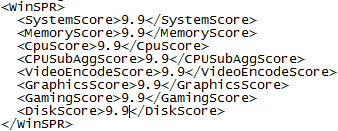
Each hardware component receives an individual subscore. Your computer's base score is determined by the lowest subscore. For example, if the lowest subscore of an individual hardware component is 2.6, then the base score is 2.6. The base score is not an average of the combined subscores. So higher score is better and my current Windows Experience index 3.0. Let's make it 9.9, the ultimate. The results of Windows Experience Index are stored in an XML file and with easy modification in this XML file change your Windows Experience Index to 9.9.
Here is the procedure.

1. Navigate to C:\Windows\Performance\WinSAT\DataStore.

2. Open the most recent file in that folder.

3. Parse the file looking for the WinSPR entry. These are the items you want to edit. The max value you can use is 9.9.
Make windows Vista Experience Index  score 9.9
4. Save the file and open the Windows Experience Index to see 9.9 score. Friends are u Watching 9.9......


Source: Steve Sinchak

Labels: ,

Sunday, August 26, 2007


Think twice no thrice before pressing Ctrl + C

Ctrl + C and Ctrl + V are the most common keyboard shortcuts used by every computer users in today's world. While filling forms or logins we find it easy to copy and paste the information like credit card number, password or user name instead of typing these manually where the chances of mistyping are more but these shortcuts can run you into serious trouble. how ?

Every time your copy something is copied to clipboard and site using combination of javascript and ASP (or PHP, CGI) can access your clipboard and get all the copied text from clipboard like passwords, user name or credit number etc. which you have copied and pasted while filling forms or for Web site login and this is enough for anyone to misuse your login id or rip of your hard earn money. Visit this site to know what's in your clipboard http://www.sourcecodesworld.com/special/clipboard.asp(at the end of this post you will find my blogger login ID and Password access by the site from the clipboard)

Now how to tackle this problem ?

First we have to see what's copied to clipboard, run Microsoft Word go to edit and select clipboard and clipboard appears to right side showing the copied data.

Using Windows Vista:
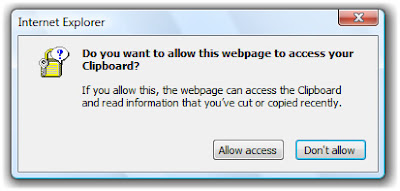
If you re using Windows vista then when you visit above mentioned site a pop up will appear "Do you want to allow this web page to access your clipboard" if you allow access then only this website access your data copied to clipboard otherwise not. So Windows vista takes care of this problem itself.
Think twice no thrice before pressing Ctrl + C

Using Windows XP, 2000:
But if you re using windows other than Windows vista i.e Windows XP, 2000 then you can easily tweak this problem.

  • Open Internet options
  • Select security tab
  • Choose custom level
  • And in security settings, select disable under Allow paste operations via scripts.

Now you can easily do Ctrl + C and Ctrl + V safely. Just joking...........nothing is there i.e. Blogger ID and Password.

Labels: , ,


Create rounded corners image in Adobe Photoshop- Very easy

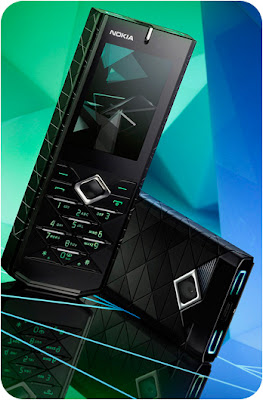
 Prism 7900 rectangular image
Rounded corners images look very good and beautiful give an edge over rectangular images and very easy to create rounded corner image from a rectangular image. The only thin you need is Adobe Photoshop. So lets get started.

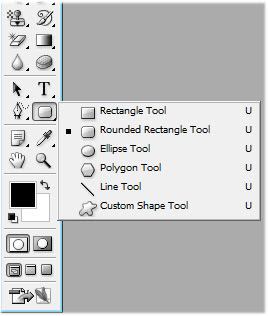
Open image in Adobe Photoshop. To create rounded corners select the Rounded Rectangle Tool from Tool palette.
Rounded Rectangle tool
Now go to the radius option and give radius in Pixels more the radius more will be the rounded corners and then select the shape layers option if it is not selected.Create rounded corners image in Adobe - Very ease Now draw the rounded rectangle on the image. You will see rectangle filled by color go to fill slider and make it zero to show beneath image.
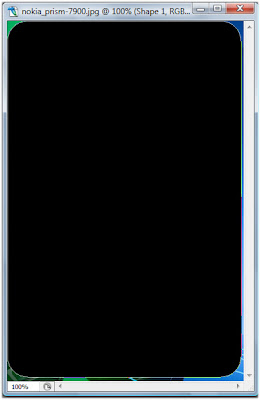
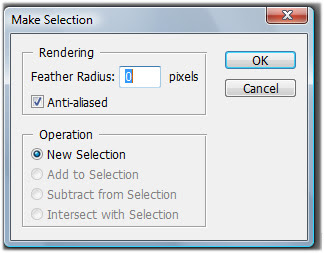
Create rounded corners image in Adobe - Very ease
Now in Path palette and right click and choose Make Selection. In Make selection box let the everything default and click OK.

Now you will see that rounded rectangle turned in to a selection.

Create rounded corners image in Adobe- Very ease
Final step go to edit menu choose Copy Merged and press ctrl + N to open a new Adobe Photoshop document and increase the width and height of new document atleast by 3 pixels otherwise full rounded corners will not be visible this is happens because every time you open a document to paste something in it then Adobe Photoshop will open a new document of exact size of copied image, click Ok. Now you will see a neat and clean rounded corner image.

 Prism 7900 rectangular image

Labels: ,